
In-world tool · v0.9.11
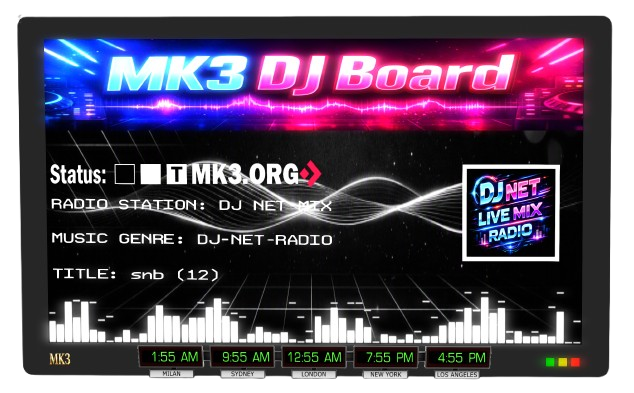
MK3 DJ Board
Register a DJ profile, broadcast your own stream to the parcel, and let visitors hear a built-in selection of internet radio stations whenever nobody's live. Here's how to use it.
What it does
One panel, two jobs.
Touch the board and a menu pops up. Register once with your DJ name, a stream URL, and a picture, and the board remembers you for next time — after that it's just "Login as DJ" to go live. The parcel music switches to your stream immediately and the display updates to show who's on.
When nobody's registered and live, the board can fall back to a built-in selection of internet radio stations instead of leaving the parcel silent.
It also works for hypergrid (HG) visitors, not just local residents — deeded to the land group, the board solves the age-old problem of HG avatars not being able to use boards like this at all.
Quick start
Becoming a DJ
-
01
Touch the panel
A menu pops up. The board needs to be deeded to the land group first — that's also what lets hypergrid (HG) visitors use it, not just local residents. Nothing happens when you touch it? You don't have permission yet — ask the region or parcel owner to check the deed and grant you access.
-
02
First time here? Click "Register"
You'll be asked for your DJ name, your stream URL (a full http:// or https:// address, no spaces), and a picture for the display — paste a texture UUID you own, or choose "Default". Finish with "Save". This only saves your details — it doesn't start broadcasting.
-
03
Ready to go live? Click "Login as DJ"
The parcel music switches to your stream immediately, and the board display updates to show your name and picture.
-
04
Already registered?
Touch the panel and click "Login as DJ" any time — no need to register again. Use "Edit Profile" from the same menu to change your name, stream, or picture.
-
05
When you're done
There's no personal "stop broadcasting" button — only the panel owner can log a DJ out on demand. Leave without logging out and the board notices, automatically reverting after a short wait on its own — or click the radio button yourself to hand it straight back to the default station.
Jump to a topic
DJ Profile & Login
Registering, editing your profile, and going live on your stream.
Automatic DJ-Away Protection
What happens if you leave the region without logging out.
Access & Permissions
Who can use the board — hypergrid visitors included — and what to do if it won't respond.
For the Panel Owner / Admin
Managing DJs, the built-in radio, and the settings notecard.
Help
What the board's own in-menu Help button does.
Getting set up
DJ Profile & Login
Register / Edit Profile
Create or update your saved DJ profile — your DJ name, stream URL, and a picture for the display. Your profile is stored permanently on the board, so there's no need to redo it on a later visit. Editing offers to keep or change each item one at a time.
Login as DJ
Goes live on your saved stream immediately — the parcel music switches over and the board display updates to show your name and picture.
Legacy DJ cards
Older setups can still authorize a DJ through a notecard placed in the panel's inventory (named "@YourAvatarName" or "@your-uuid"). Most DJs won't need this — it only applies if the panel owner set your access up the old way instead of through Register.
Peace of mind
Automatic DJ-Away Protection
What happens if I just leave without logging out?
The board keeps an eye on whether the live DJ is still in the region. Leave and don't come back within the configured time limit, and it automatically stops your stream and switches to a default backup station — or turns the radio off if no backup is set — so the music never stays stuck on your stream.
Can I switch it back myself instead of waiting?
Yes — touch the panel and click the radio button any time to hand the parcel straight back to the default station, no waiting on the timeout.
Who can DJ
Access & Permissions
Can hypergrid (HG) visitors use the board?
Yes. Deeded to the land group, the board solves the age-old problem of hypergrid visitors not being recognized by boards that only check for the parcel/object owner — group membership works across the hypergrid, so an HG avatar added to the land group can register and go live exactly like a local resident.
The panel doesn't respond when I touch it
Whether you can use the board at all depends on settings the panel owner controls — access can be limited to the parcel/object owner only, to a specific group, or opened to everyone. A silent touch is almost always an access issue — ask the owner to check yours (and, for HG visitors, whether the board has been deeded to the land group at all).
Owner/Admin only
For the Panel Owner / Admin
Radio
Browse and play the board's built-in internet radio stations by genre, or turn the radio fully on/off — handy for background music when no DJ is signed up.
DJ Admin
Manage every DJ from one menu: Add Nearby (pick someone standing nearby to create or edit their profile for them), Add UUID (do the same by pasting in an avatar's UUID — they don't need to be online or in the region), DJ List (view every saved DJ, edit their stream, or delete them — deleting also blocks that DJ from registering or logging in again until re-added), and Logout DJ (immediately stops whoever's currently live, then lets you log yourself in, switch to the default station, go back to DJ Admin, or cancel).
Save Images
Saves whatever picture is currently showing on the DJ display and the board artwork, so they survive a script reset or the object being re-rezzed.
Settings notecard
Edit the "Radio Control config" notecard to add or remove radio stations and genres, change who has access, change the default picture, and set the DJ-away timeout and backup station described above.
One more thing
Help
HELP (in the main menu)
Opens this page in your browser, with a clickable link also sent to you in local chat as a backup in case your viewer blocks the pop-up.
Before you start
Tips
- Deed the board to the land group — this is also what lets hypergrid (HG) visitors use it — and make sure only people you want able to DJ are actually in that group.
- Stream URLs must be a complete address starting with
http://orhttps://, with no spaces in it. - Picture entries need a full texture UUID (36 characters, the format shown in your inventory) — or just choose "Default".
- Menus time out after a short while if you don't respond — just touch the panel again to reopen it.
- Only one DJ can be live at a time; logging in as DJ while someone else is live takes over the broadcast.